array-methods
Array Methods#
Author: @alaa-yasin and @Fatmasiam
Arrays have a good number of methods such as forEach(), map(), filter(), reduce(), sort(), ...etc
- What can you see after each method's name?
- What does that mean?
- What do you think the output will be if we don't write them?
So, what are methods?#
Methods are built-in or user-defined functions used in different cases.
- Built-in methods vs user-defined methods#
- Built-in method is any function that is provided by any language library. such as:
- Whereas, _user-defined methods are functions defined by users themselves in order to have their work done. such as:
As we learned before, we can access arrays' elements by their index.
So, what if I have an array of 100 elements, and I want to console.log everything in this array? Is it logical to access each element as this?
That is why methods are created 😉#
pop/push, shift/unshift#
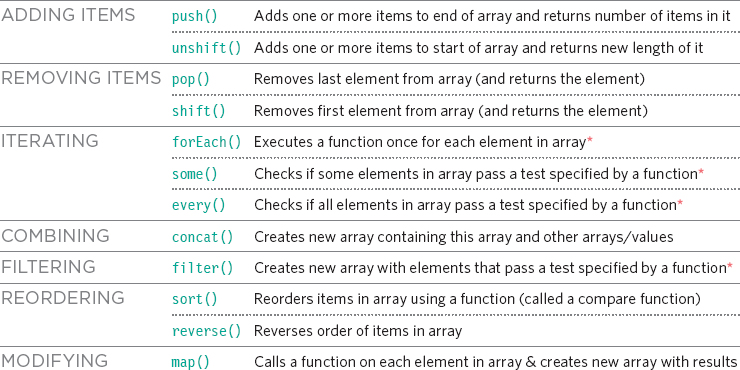
- push() method adds one or more elements to the end of an array and returns the new length of the array.
- pop() method removes the last element from an array and returns that element. This method changes the length of the array.
- unshift() method adds one or more elements to the beginning of an array and returns the new length of the array.
- shift() method removes the first element from an array and returns that removed element. This method changes the length of the array.
Array: Push() :#
The push() method can append one or more elements to the end of an array. For example:
Array: Pop()#
The pop() method pulls the last element off of the given array and returns it For example:
Array: Unshift()#
The unshift() method is like the push() method, only it works at the beginning of the array. The unshift() method can prepend one or more elements to the beginning of an array.
For example:
Array: Shift()#
The shift() method is like the pop() method, only it works at the beginning of the array. The shift() method pulls the first element off of the given array and returns it.
For example:
Array.forEach()#
So, forEach() is a function that executes a provided function once for each array element in ascending order.
forEach() method returns 'undefined'. It doesn't change the original array.
Array.map()#
So. map() is a function that creates a new array populated with the results of executing a provided function on every array element. map() method returns a new array with the same number of the original array elements. It doesn't change the original array.
Array.filter()#
So, filter() is a function that creates a new array with all elements that pass the test implemented by the provided function. filter() method returns a new array with a different number of the original array elements. It doesn't change the original array.
Array.reduce()#
Let's split it:#
So, reduce() is a function that executes a reducer function (that you provide) on each element of the array, resulting in a single output value. reduce() method returns a single output value. It doesn't change the original array.
Array.sort()#
To sort strings:#
To sort numbers in ascending order:#
To sort numbers in descending order:#
So, sort() is a function that sorts array elements in place and returns the sorted array. sort() method returns a sorted array. It doesn't return a new array; it changes the positions of the elements in the original array.
split and join#
Here’s the situation from real life. We are writing a messaging app, and the person enters the comma-delimited list of receivers: John, Pete, Mary. But for us an array of names would be much more comfortable than a single string. How to get it?
The str.split(delim) method does exactly that. It splits the string into an array by the given delimiter delim.
In the example below, we split by a comma followed by space:
The split method has an optional second numeric argument – a limit on the array length. If it is provided, then the extra elements are ignored. In practice it is rarely used though:
Split into letters
The split() method turns a String into an array of strings, by separating the string at each instance of a specified separator string.
The call arr.join(glue) does the reverse to split. It creates a string of arr items joined by glue between them.
For instance:
The join() method creates and returns a new string by concatenating all of the elements in an array (or an array-like object), separated by commas or a specified separator string. If the array has only one item, then that item will be returned without using the separator.